Static site hosting with AWS (S3, ACM and Cloudfront) and Terraform

Introduction
All code can be found here.
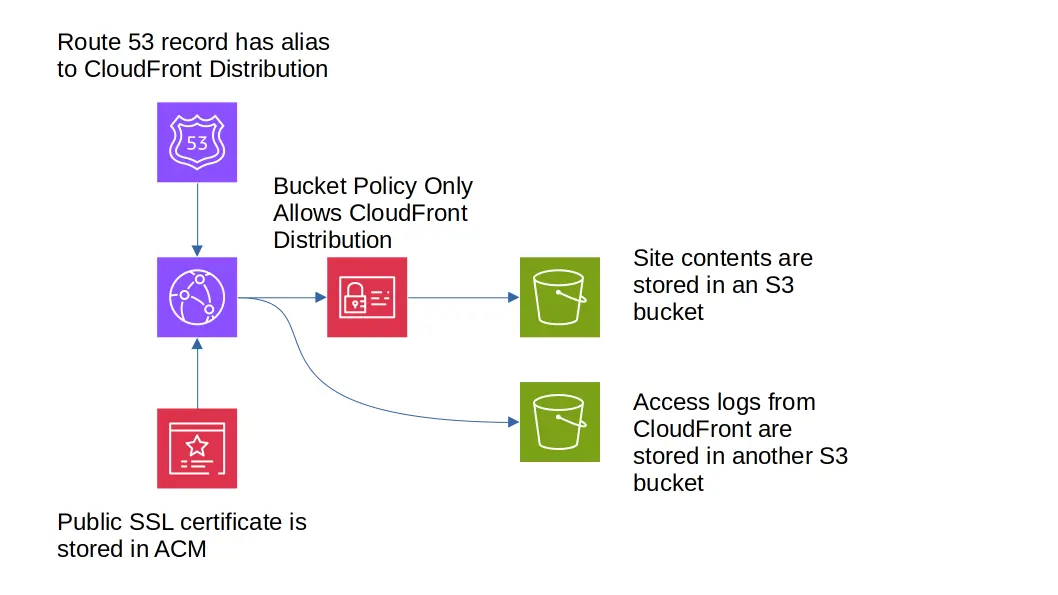
This is a walkthrough of the terraform needed to:
- Create an S3 bucket to hold your static sites content and another bucket to hold logs from user access.
- Create S3 Bucket policies to restrict access to your bucket such that Cloudfront can access, but it is not publicly available from the bucket its self.
- Create a Route 53 record for a already existing hosted zone
- Provision a public SSL certificate from ACM for a domain you have as a hosted zone in Route 53.
- Create a CloudFront distribution to serve the content from your S3 bucket over HTTPS. Additionally creating a
CloudFrontOrigin Access Control that will give us a specific principal to use for restricting access to ourS3bucket. - Crate an IAM role to assume so that the site can be deployed without access to other admin privileges.
- BONUS A script (written in javascript / nodejs) that will take the contents of a folder deploy them to your S3 bucket for deployment.
Here is a diagram of the solution:
Terraform Walkthrough
main.tf
Here we are just setting up our terraform providers. Note the second aws provider aliased to acm_provider When using ACM with CloudFront you must set up the ACM certificates in the region us-east-1 per the docs.
At the bottom of the file I make a aws_caller_identity to allow me to access my account number for creating IAM policy later.
terraform {
  required_providers {
    aws = {
      source  = "hashicorp/aws"
      version = "~> 5.0"
    }
  }
}

provider "aws" {
  region = var.region
  default_tags {
    tags = {
      project = var.domain_name
    }
  }
}

provider "aws" {
  // region needs to be us-east-1 for ACM used by CloudFront
  // https://docs.aws.amazon.com/AmazonCloudFront/latest/DeveloperGuide/cnames-and-https-requirements.html
  alias  = "acm_provider"
  region = "us-east-1"
  default_tags {
    tags = {
      project = var.domain_name
    }
  }
}

data "aws_caller_identity" "current" {}
variables.tf
This file contains the variables used by the terraform to make the code more reusable. For instance this could be a terraform module you use as part of a larger infrastructure.
variable "region" {
  default     = "us-east-2"
  description = "The region to deploy in"
  type        = string
}

variable "hosted_zone_name" {
  default     = "cechols.com"
  description = "The name of the hosted zone in Route 53"
  type        = string
}

variable "domain_name" {
  default     = "blog.cechols.com"
  description = "The domain name of the website"
  type        = string
}
outputs.tf
These are the outputs of the terraform. Some of these values are needed by the deploy script like the bucket_name, deployer_role_arn and region
output "domain_name" {
  value = var.domain_name
}

output "region" {
  value = var.region
}

output "bucket_arn" {
  value = aws_s3_bucket.site.arn
}

output "bucket_name" {
  value = aws_s3_bucket.site.id
}

output "log_bucket_arn" {
  value = aws_s3_bucket.logs.arn
}

output "log_bucket_name" {
  value = aws_s3_bucket.logs.id
}

output "site_url" {
  value = "https://${var.domain_name}"
}

output "deployer_role_arn" {
  value = aws_iam_role.deploy.arn
}
s3.tf
This file creates out S3 bucket that our static site is stored in as well as the S3 bucket for the CloudFront logs. The site deployment bucket has a bucket policy that only allows the CloudFront distribution to access it. The log bucket is a private bucket.
resource "aws_s3_bucket" "site" {
  # TODO: over thinking here, but could this cause a collision? Should we use bucket_prefix?
  bucket = var.domain_name
}

resource "aws_s3_bucket_ownership_controls" "site" {
  bucket = aws_s3_bucket.site.id
  rule {
    object_ownership = "BucketOwnerPreferred"
  }
}

data "aws_iam_policy_document" "site_policy" {
  statement {
    sid    = "PublicReadGetObjectCFPrincipal"
    effect = "Allow"
    principals {
      type        = "Service"
      identifiers = ["cloudfront.amazonaws.com"]
    }
    actions   = ["s3:GetObject"]
    resources = ["${aws_s3_bucket.site.arn}/*"]
    condition {
      test     = "StringEquals"
      variable = "AWS:SourceArn"
      values   = ["arn:aws:cloudfront::${data.aws_caller_identity.current.account_id}:distribution/${aws_cloudfront_distribution.site.id}"]
    }
  }
  statement {
    sid    = "PublicReadGetObjectCFOAI"
    effect = "Allow"
    principals {
      type        = "AWS"
      identifiers = [aws_cloudfront_origin_access_identity.site.iam_arn]
    }
    actions   = ["s3:GetObject"]
    resources = ["${aws_s3_bucket.site.arn}/*"]
  }
}

resource "aws_s3_bucket_policy" "site" {
  bucket = aws_s3_bucket.site.id
  policy = data.aws_iam_policy_document.site_policy.json
}

### Site logs bucket

resource "aws_s3_bucket" "logs" {
  # TODO: over thinking here, but could this cause a collision? Should we use bucket_prefix?
  bucket = "${var.domain_name}-logs"
}

resource "aws_s3_bucket_ownership_controls" "logs" {
  bucket = aws_s3_bucket.logs.id
  rule {
    object_ownership = "BucketOwnerPreferred"
  }
}

resource "aws_s3_bucket_acl" "logs" {
  bucket = aws_s3_bucket.logs.id
  acl    = "private"

  depends_on = [aws_s3_bucket_ownership_controls.logs]
}
acm.tf
Here I are requesting an SSL certificate signed by AWS for our HTTPS traffic. I am using the DNS validation method and creating a aws_acm_certificate_validation to start that process. the aws_acm_certificate_validation resource is a little weird because it does not represent a specific resource in AWS… You can also manually add the DNS record if you need to for domain control validation.
resource "aws_acm_certificate" "site" {
  provider          = aws.acm_provider
  domain_name       = var.domain_name
  validation_method = "DNS"

  lifecycle {
    create_before_destroy = true
  }
}

resource "aws_acm_certificate_validation" "site" {
  provider                = aws.acm_provider
  certificate_arn         = aws_acm_certificate.site.arn
  validation_record_fqdns = [aws_route53_record.site.fqdn]
}
route53.tf
Here we are using a data element to get the data on the hosted zone we already have configure in AWS. Then we create a new DNS A record to redirect to the CloudFront distribution.
data "aws_route53_zone" "site" {
  name         = var.hosted_zone_name
  private_zone = false
}

resource "aws_route53_record" "site" {
  zone_id = data.aws_route53_zone.site.id
  name    = var.domain_name
  type    = "A"
  alias {
    name                   = aws_cloudfront_distribution.site.domain_name
    zone_id                = aws_cloudfront_distribution.site.hosted_zone_id
    evaluate_target_health = false
  }
}
cloudfront.tf
This is where we are creating a CloudFront distribution for exposing our static site to the public. Additionally the aws_cloudfront_origin_access_identity is created to have a specific identity and role arn to restrict access to the S3 bucket holding the site files. This means the only way someone should be able to access our site is through CloudFront.
I have seen examples where people host an S3 website and then forward CloudFront traffic to the S3 website. This allows two possible ways to access the site. ultimately this is not a big deal in most cases, but its better to have only one in my case.
locals {
  cf_origin_id = "S3-${var.domain_name}"
}

resource "aws_cloudfront_origin_access_identity" "site" {
  comment = "CF access identity for hosting ${var.domain_name}"
}

resource "aws_cloudfront_distribution" "site" {
  origin {
    domain_name = aws_s3_bucket.site.bucket_regional_domain_name
    origin_id   = local.cf_origin_id

    s3_origin_config {
      origin_access_identity = aws_cloudfront_origin_access_identity.site.cloudfront_access_identity_path
    }

  }

  enabled             = true
  is_ipv6_enabled     = true
  default_root_object = "index.html"

  aliases = ["${var.domain_name}"]

  default_cache_behavior {
    allowed_methods  = ["GET", "HEAD"]
    cached_methods   = ["GET", "HEAD"]
    target_origin_id = local.cf_origin_id

    forwarded_values {
      query_string = true
      cookies {
        # I need to change this to whitelist... in the case auth stuff is ever in the cookies...
        forward = "all"
        # whitelisted_names = [  ]
      }
      headers = []
    }

    viewer_protocol_policy = "redirect-to-https"
    min_ttl                = 0
    default_ttl            = 600
    max_ttl                = 3600
  }

  logging_config {
    include_cookies = true
    bucket          = "${aws_s3_bucket.logs.id}.s3.amazonaws.com"
    prefix          = var.domain_name
  }

  restrictions {
    geo_restriction {
      restriction_type = "none"
    }
  }

  viewer_certificate {
    acm_certificate_arn      = aws_acm_certificate.site.arn
    ssl_support_method       = "sni-only"
    minimum_protocol_version = "TLSv1"
  }
}
iam.tf
All of the code here is creating an IAM role for deploying the static site to our S3 bucket and allowing that role to be assumed by any user in your AWS account.
data "aws_iam_policy_document" "deploy_assume" {
  statement {
    effect = "Allow"
    principals {
      type        = "AWS"
      identifiers = ["arn:aws:iam::${data.aws_caller_identity.current.account_id}:root"]
    }
    actions = [
      "sts:AssumeRole"
    ]
  }
}

resource "aws_iam_role" "deploy" {
  name_prefix        = "${var.domain_name}-site-deployer-"
  assume_role_policy = data.aws_iam_policy_document.deploy_assume.json
}

data "aws_iam_policy_document" "deploy" {
  statement {
    sid    = "SiteListContents"
    effect = "Allow"
    actions = [
      "s3:ListBucket",
    ]
    resources = [
      "${aws_s3_bucket.site.arn}",
    ]
  }
  statement {
    sid    = "SiteDeleteAndWrite"
    effect = "Allow"
    actions = [
      "s3:DeleteObject",
      "s3:PutObject",
    ]
    resources = [
      "${aws_s3_bucket.site.arn}/*",
    ]
  }
}

resource "aws_iam_policy" "deploy" {
  name_prefix = "${var.domain_name}-site-deployer-"
  policy      = data.aws_iam_policy_document.deploy.json
}

resource "aws_iam_role_policy_attachment" "deploy" {
  role       = aws_iam_role.deploy.id
  policy_arn = aws_iam_policy.deploy.arn
}
Deployment Script
This is a very simple nodejs script that will take the contents of a directory and deploy it to an S3 bucket.
There are three variables toward the top called roleARN, bucket and region these values can be retrieved from the terraform output command once the terraform has been applied.
roleARN- The ARN of the role we created to do the deployment. In the terraform output this is nameddeployer_role_arn.bucket- The name of theS3bucket where your static site contents will be stored. In the terraform output this is namedbucket_name.region- The AWS region that the terraform was applied to. In the terraform output this is namedregion.
In the repo I have a npm task called deploy that invokes this script.
import { S3Client, ListObjectsV2Command, DeleteObjectCommand, PutObjectCommand } from "@aws-sdk/client-s3";
import { STSClient, AssumeRoleCommand } from "@aws-sdk/client-sts";
import { resolve, join } from "path";
import { readFileSync, readdirSync, lstatSync } from "fs";
import mime from "mime-types";


// TODO: fill these in! or get terraform state and populate them...
// The Role ARN for site deployment as output by terraform
const roleARN = "";
// The bucket name the site is deployed into as output by terraform
const bucket = "";
// The region used to create the resources in terraform. This would be the same as the value of the terraform output region.
const region = "";
// This assumes the CWD is the parent directory of the directory this script is located in...
const siteLocation = resolve("dist");

/**
 *
 * @param {string} rootDir
 * @param {string[]} additionalPathParts
 */
function enumerateDir(rootDir, additionalPathParts = []) {
    let objects = [];
    const contents = readdirSync(rootDir);
    for (const item of contents) {
        const fullPath = join(rootDir, item);
        const stat = lstatSync(fullPath);
        if (stat.isDirectory()) {
            // need recursive call for dir...
            objects = objects.concat(enumerateDir(fullPath, [...additionalPathParts, item]));
            continue;
        }
        const content = readFileSync(fullPath, {

        });
        let key = item;
        if (additionalPathParts.length > 0) {
            key = `${additionalPathParts.join("/")}/${item}`;
        }
        objects.push({
            key: key,
            content: content,
            mime: mime.lookup(key),
        });
    }
    return objects;
}


(async () => {;
    console.log("starting site deployment");
    let credentials = undefined;
    try {
        const sts = new STSClient({

        });
        console.log("assuming role for deployment");
        const assumeRoleCommand = new AssumeRoleCommand({
            RoleArn: roleARN,
            RoleSessionName: "site-deploy",
        });
        const assumeRoleResult = await sts.send(assumeRoleCommand);
        credentials = assumeRoleResult.Credentials;
    } catch (ex) {
        // uh oh...
        console.log("failed to assume role", JSON.stringify(ex.message));
        return;
    }

    const s3 = new S3Client({
        credentials: {
            accessKeyId: credentials.AccessKeyId,
            secretAccessKey: credentials.SecretAccessKey,
            sessionToken: credentials.SessionToken
        },
        region,
    });

    // enumerate contents of bucket
    let callCount = 1;

    let existingObjects = [];
    try {
        console.log("getting contents of bucket for delete");
        const listObjectsCommand = new ListObjectsV2Command({
            Bucket: bucket,
        });
        let isTruncated = true

        while (isTruncated) {
            const { Contents, IsTruncated, NextContinuationToken, KeyCount } = await s3.send(listObjectsCommand);
            if (KeyCount > 0) {
                existingObjects = existingObjects.concat(Contents);
            }
            isTruncated = IsTruncated;
            listObjectsCommand.input.ContinuationToken = NextContinuationToken;
        }
    } catch (ex) {
        console.log(`S3 list objects failed on call count ${callCount}`, JSON.stringify(ex.message));
        return;
    }

    console.log("finished getting existing items", existingObjects.length);

    // delete existing bucket contents
    try {
        console.log("deleting existing files");
        for (const object of existingObjects) {
            const deleteCommand = new DeleteObjectCommand({
                Bucket: bucket,
                Key: object.Key,
            });
            await s3.send(deleteCommand);
        }
    } catch (ex) {
        console.log(`S3 delete object failed`, JSON.stringify(ex));
        return;
    }


    // put all files from dist folder in s3...
    console.log("enumerating static site folder for upload");
    const filesToUpload = enumerateDir(siteLocation);
    try {
        console.log("uploading new files");
        for (const file of filesToUpload) {
            const putObjectCommand = new PutObjectCommand({
                Bucket: bucket,
                Key: file.key,
                Body: file.content,
                ContentType: file.mime,
            });
            await s3.send(putObjectCommand);
        }
    } catch (ex) {
        console.log(`S3 put object failed`, JSON.stringify(ex));
        return;
    }
    console.log("deployment complete", filesToUpload.length);
})();